# Mutations
TanStack DB provides a powerful mutation system that enables optimistic updates with automatic state management. This system is built around a pattern of **optimistic mutation → mutation handler → handler-defined settlement**. A handler can extend that boundary through backend confirmation by waiting for the write to sync back before it returns. This creates a highly responsive user experience while maintaining data consistency and being easy to reason about.
Local changes are applied immediately as optimistic state. When the mutation handler returns successfully while the transaction is still `persisting`, the transaction completes and the optimistic state is recomputed. Completion proves backend confirmation only when the handler explicitly waited for that confirmation or read-back.
```tsx
// Define a collection with a mutation handler
const todoCollection = createCollection({
id: "todos",
onUpdate: async ({ transaction }) => {
const mutation = transaction.mutations[0]
await api.todos.update(mutation.original.id, mutation.changes)
},
})
// Apply an optimistic update
todoCollection.update(todo.id, (draft) => {
draft.completed = true
})
```
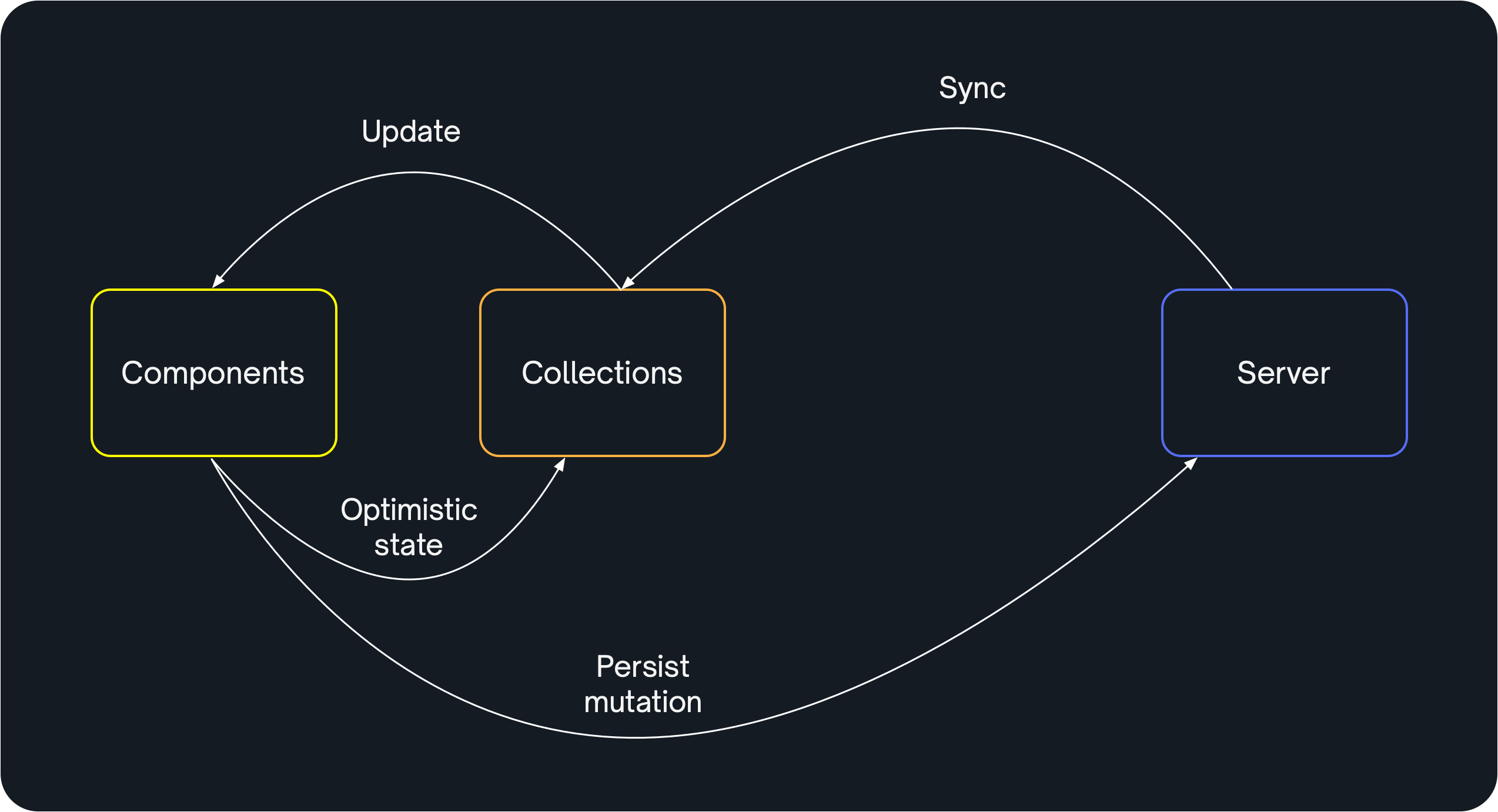
This pattern extends the Redux/Flux unidirectional data flow beyond the client to include the server:
The instant inner loop provides optimistic state. The slower outer loop is owned
by the mutation handler, which can persist to a server and wait for the updated
server state to sync back into the collection when that confirmation is
required.
### Simplified Mutations vs Traditional Approaches
TanStack DB's mutation system eliminates much of the boilerplate required for optimistic updates in traditional approaches. Compare the difference:
**Before (TanStack Query with manual optimistic updates):**
```typescript
const addTodoMutation = useMutation({
mutationFn: async (newTodo) => api.todos.create(newTodo),
onMutate: async (newTodo) => {
await queryClient.cancelQueries({ queryKey: ['todos'] })
const previousTodos = queryClient.getQueryData(['todos'])
queryClient.setQueryData(['todos'], (old) => [...(old || []), newTodo])
return { previousTodos }
},
onError: (err, newTodo, context) => {
queryClient.setQueryData(['todos'], context.previousTodos)
},
onSettled: () => {
queryClient.invalidateQueries({ queryKey: ['todos'] })
},
})
```
**After (TanStack DB):**
```typescript
const todoCollection = createCollection(
queryCollectionOptions({
queryKey: ['todos'],
queryFn: async () => api.todos.getAll(),
getKey: (item) => item.id,
schema: todoSchema,
onInsert: async ({ transaction }) => {
await Promise.all(
transaction.mutations.map((mutation) =>
api.todos.create(mutation.modified)
)
)
},
})
)
// Simple mutation - no boilerplate!
todoCollection.insert({
id: crypto.randomUUID(),
text: '🔥 Make app faster',
completed: false,
})
```
The benefits:
- ✅ Automatic optimistic updates
- ✅ Automatic rollback on error
- ✅ No manual cache manipulation
- ✅ Type-safe mutations
## Table of Contents
- [Mutation Approaches](#mutation-approaches)
- [Mutation Lifecycle](#mutation-lifecycle)
- [Collection Write Operations](#collection-write-operations)
- [Operation Handlers](#operation-handlers)
- [Creating Custom Actions](#creating-custom-actions)
- [Manual Transactions](#manual-transactions)
- [Paced Mutations](#paced-mutations)
- [Mutation Merging](#mutation-merging)
- [Controlling Optimistic Behavior](#controlling-optimistic-behavior)
- [Transaction States](#transaction-states)
- [Handling Temporary IDs](#handling-temporary-ids)
## Mutation Approaches
TanStack DB provides different approaches to mutations, each suited to different use cases:
### Collection-Level Mutations
Collection-level mutations (`insert`, `update`, `delete`) are designed for **direct state manipulation** of a single collection. These are the simplest way to make changes and work well for straightforward CRUD operations.
```tsx
// Direct state change
todoCollection.update(todoId, (draft) => {
draft.completed = true
draft.completedAt = new Date()
})
```
Use collection-level mutations when:
- You're making simple CRUD operations on a single collection
- The state changes are straightforward and match what the server will store
You can use `metadata` to annotate these operations and customize behavior in your handlers:
```tsx
// Annotate with metadata
todoCollection.update(
todoId,
{ metadata: { intent: 'complete' } },
(draft) => {
draft.completed = true
}
)
// Use metadata in handler
onUpdate: async ({ transaction }) => {
const mutation = transaction.mutations[0]
if (mutation.metadata?.intent === 'complete') {
await Promise.all(
transaction.mutations.map((mutation) =>
api.todos.complete(mutation.original.id)
)
)
} else {
await Promise.all(
transaction.mutations.map((mutation) =>
api.todos.update(mutation.original.id, mutation.changes)
)
)
}
}
```
### Intent-Based Mutations with Custom Actions
For more complex scenarios, use `createOptimisticAction` to create **intent-based mutations** that capture specific user actions.
```tsx
// Intent: "like this post"
const likePost = createOptimisticAction({
onMutate: (postId) => {
// Optimistic guess at the change
postCollection.update(postId, (draft) => {
draft.likeCount += 1
draft.likedByMe = true
})
},
mutationFn: async (postId) => {
// Send the intent to the server
await api.posts.like(postId)
// Server determines actual state changes
await postCollection.utils.refetch()
},
})
// Use it.
likePost(postId)
```
Use custom actions when:
- You need to mutate **multiple collections** in a single transaction
- The optimistic change is a **guess** at how the server will transform the data
- You want to send **user intent** to the backend rather than exact state changes
- The server performs complex logic, calculations, or side effects
- You want a clean, reusable mutation that captures a specific operation
Custom actions provide the cleanest way to capture specific types of mutations as named operations in your application. While you can achieve similar results using metadata with collection-level mutations, custom actions make the intent explicit and keep related logic together.
**When to use each:**
- **Collection-level mutations** (`collection.update`): Simple CRUD operations on a single collection
- **`createOptimisticAction`**: Intent-based operations, multi-collection mutations, immediately committed
- **Bypass the mutation system**: Use your existing mutation logic without rewriting
### Bypass the Mutation System
If you already have mutation logic in an existing system and don't want to rewrite it, you can **completely bypass** TanStack DB's mutation system and use your existing patterns.
With this approach, you write to the server like normal using your existing logic, then use your collection's mechanism for refetching or syncing data to await the server write. After the sync completes, the collection will have the updated server data and you can render the new state, hide loading indicators, show success messages, navigate to a new page, etc.
```tsx
// Call your backend directly with your existing logic
const handleUpdateTodo = async (todoId, changes) => {
await api.todos.update(todoId, changes)
// Wait for the server change to load into the collection
await todoCollection.utils.refetch()
// Now you know the new data is loaded and can render it or hide loaders
}
// With Electric
const handleUpdateTodo = async (todoId, changes) => {
const { txid } = await api.todos.update(todoId, changes)
// Wait for this specific transaction to sync into the collection
await todoCollection.utils.awaitTxId(txid)
// Now the server change is loaded and you can update UI accordingly
}
```
Use this approach when:
- You have existing mutation logic you don't want to rewrite
- You're comfortable with your current mutation patterns
- You want to use TanStack DB only for queries and state management
How to sync changes back:
- **QueryCollection**: Manually refetch with `collection.utils.refetch()` to reload data from the server
- **ElectricCollection**: Use `collection.utils.awaitTxId(txid)` to wait for a specific transaction to sync
- **Other sync systems**: Wait for your sync mechanism to update the collection
## Mutation Lifecycle
The mutation lifecycle follows a consistent pattern across all mutation types:
1. **Optimistic state applied**: The mutation is immediately applied to the local collection as optimistic state
2. **Handler invoked**: The appropriate handler — either `mutationFn` or a Collection handler (`onInsert`, `onUpdate`, or `onDelete`) — is called to persist the change
3. **Handler-defined persistence**: Your handler performs the required local or backend work
4. **Optional confirmation**: If transaction completion must mean server confirmation, the handler waits for the provider's acknowledgement, read-back, or sync observation
5. **Successful transaction settlement**: If the handler returns while the transaction is still `persisting`, the transaction becomes `completed` and the visible state is recomputed from synced data and any remaining optimistic transactions
```tsx
// Step 1: Optimistic state applied immediately
todoCollection.update(todo.id, (draft) => {
draft.completed = true
})
// UI updates instantly with optimistic state
// Step 2-3: onUpdate handler performs its persistence work
// Step 4: The handler may wait for sync back when confirmation is required
// Step 5: Handler return settles the transaction and recomputes visible state
```
If the handler throws an error during persistence, the optimistic state is automatically rolled back.
`tx.isPersisted.promise` observes this transaction-settlement boundary. Despite
the property name, it does not by itself prove that a server uploaded,
confirmed, or returned the write. It proves those stronger guarantees only
when the handler waits for that backend observation before returning.
### Concurrent Optimistic Transactions
Separate transactions that update the same row are layered as whole-row
snapshots. The latest contributing whole-row snapshot supplies the visible row;
fields are not independently merged from whichever transactions remain
pending. Each later `update()` draft starts from the current visible state,
including optimistic changes from earlier transactions, so edits can build on
one another.
```tsx
const tx1 = docCollection.update(docId, (draft) => {
draft.content = 'A'
})
const tx2 = docCollection.update(docId, (draft) => {
// This draft sees content = 'A'.
draft.content = 'B'
})
const tx3 = docCollection.update(docId, (draft) => {
// This draft sees content = 'B'.
draft.content = 'C'
})
// Visible content is now 'C'. If tx1 and then tx2 settle while tx3 is still
// active, 'C' remains visible.
```
If a newer transaction stops contributing while an older one is still active,
the older transaction's snapshot can become visible again until that older
transaction itself settles or rolls back. Do not infer server execution order
from the local layering order. Multiple writes to the same row inside one
manual transaction are different: they merge into that transaction's single
pending mutation according to the
[mutation-merging rules](#mutation-merging).
## Collection Write Operations
Collections support three core write operations: `insert`, `update`, and `delete`. Each operation applies optimistic state immediately and triggers the corresponding operation handler.
### Insert
Add new items to a collection:
```typescript
// Insert a single item
todoCollection.insert({
id: "1",
text: "Buy groceries",
completed: false
})
// Insert multiple items
todoCollection.insert([
{ id: "1", text: "Buy groceries", completed: false },
{ id: "2", text: "Walk dog", completed: false },
])
// Insert with metadata
todoCollection.insert(
{ id: "1", text: "Custom item", completed: false },
{ metadata: { source: "import" } }
)
// Insert without optimistic updates
todoCollection.insert(
{ id: "1", text: "Server-validated item", completed: false },
{ optimistic: false }
)
```
**Returns**: A `Transaction` object that you can use to track the mutation's lifecycle.
### Update
Modify existing items using an immutable draft pattern:
```typescript
// Update a single item
todoCollection.update(todo.id, (draft) => {
draft.completed = true
})
// Update multiple items
todoCollection.update([todo1.id, todo2.id], (drafts) => {
drafts.forEach((draft) => {
draft.completed = true
})
})
// Update with metadata
todoCollection.update(
todo.id,
{ metadata: { reason: "user update" } },
(draft) => {
draft.text = "Updated text"
}
)
// Update without optimistic updates
todoCollection.update(
todo.id,
{ optimistic: false },
(draft) => {
draft.status = "server-validated"
}
)
```
**Parameters**:
- `key` or `keys`: The item key(s) to update
- `options` (optional): Configuration object with `metadata` and/or `optimistic` flags
- `updater`: Function that receives a draft to mutate
**Returns**: A `Transaction` object that you can use to track the mutation's lifecycle.
> [!IMPORTANT]
> The `updater` function uses an Immer-like pattern to capture changes as immutable updates. You must not reassign the draft parameter itself—only mutate its properties.
Existing row values stay isolated from draft edits. New objects you assign or
add to a draft keep normal shared references during the synchronous callback:
```ts
const tag = { label: 'new' }
todoCollection.update(todoId, (draft) => {
draft.tags.add(tag) // tags is a Set
tag.label = 'edited' // included in the update
for (const value of draft.tags) value.label = 'final'
// tag.label is now 'final' too
})
tag.label = 'later' // does not change the stored row
```
The completed changes are copied when the callback returns. This applies to
new Map values, Set members, and objects assigned to draft properties. If you
need to keep a new caller-owned object unchanged during the callback, insert
your own copy. A thrown callback does not roll back edits to that caller-owned
object; it leaves existing collection data unchanged.
Arbitrary class instances are an exception: newly assigned instances stay by
reference so their methods, prototypes, and private fields remain intact.
Later changes to such an instance can therefore affect stored data without a
new update or notification. Treat those instances as immutable, or convert them
to plain data before assignment when you need isolation. Supported native values
such as `URL`, `Date`, `RegExp`, and typed arrays are copied instead.
### Delete
Remove items from a collection:
```typescript
// Delete a single item
todoCollection.delete(todo.id)
// Delete multiple items
todoCollection.delete([todo1.id, todo2.id])
// Delete with metadata
todoCollection.delete(todo.id, {
metadata: { reason: "completed" }
})
// Delete without optimistic updates
todoCollection.delete(todo.id, { optimistic: false })
```
**Parameters**:
- `key` or `keys`: The item key(s) to delete
- `options` (optional): Configuration object with `metadata` and/or `optimistic` flags
**Returns**: A `Transaction` object that you can use to track the mutation's lifecycle.
## Operation Handlers
Operation handlers are functions you provide when creating a collection that handle persisting mutations to your backend. Each collection can define three optional handlers: `onInsert`, `onUpdate`, and `onDelete`.
### Handler Signature
All operation handlers receive an object with the following properties:
```typescript
type OperationHandler = (params: {
transaction: Transaction
collection: Collection
}) => Promise | any
```
The `transaction` object contains:
- `mutations`: Array of mutation objects, each with:
- `collection`: The collection being mutated
- `type`: The mutation type (`'insert'`, `'update'`, or `'delete'`)
- `original`: The original item (for updates and deletes)
- `modified`: The modified item (for inserts and updates)
- `changes`: The changes object (for updates)
- `key`: The item key
- `metadata`: Optional metadata attached to the mutation
### Defining Operation Handlers
Define handlers when creating a collection:
```typescript
const todoCollection = createCollection({
id: "todos",
// ... other options
onInsert: async ({ transaction }) => {
await Promise.all(
transaction.mutations.map((mutation) =>
api.todos.create(mutation.modified)
)
)
},
onUpdate: async ({ transaction }) => {
await Promise.all(
transaction.mutations.map((mutation) =>
api.todos.update(mutation.original.id, mutation.changes)
)
)
},
onDelete: async ({ transaction }) => {
await Promise.all(
transaction.mutations.map((mutation) =>
api.todos.delete(mutation.original.id)
)
)
},
})
```
> [!IMPORTANT]
> Operation handlers must not resolve until the server changes have synced back to the collection. Different collection types provide different patterns to ensure this happens correctly.
>
> Do not call or await `collection.preload()`, live-query `preload()`, or a
> direct `loadSubset()` inside a mutation handler. The optimistic mutation is
> already applied when the handler starts. A preload may need a sync commit
> that is queued behind that same handler, which creates a deadlock. Use the
> collection adapter's documented mutation acknowledgement pattern instead.
### Collection-Specific Handler Patterns
Different collection types have specific patterns for their handlers:
**QueryCollection** - automatically refetches after handler completes:
```typescript
onUpdate: async ({ transaction }) => {
await Promise.all(
transaction.mutations.map((mutation) =>
api.todos.update(mutation.original.id, mutation.changes)
)
)
// Automatic refetch happens after handler completes
}
```
**ElectricCollection** - return txid(s) to track sync:
```typescript
onUpdate: async ({ transaction }) => {
const txids = await Promise.all(
transaction.mutations.map(async (mutation) => {
const response = await api.todos.update(mutation.original.id, mutation.changes)
return response.txid
})
)
return { txid: txids }
}
```
### Generic Mutation Functions
You can define a single mutation function for your entire app:
```typescript
import type { MutationFn } from "@tanstack/react-db"
const mutationFn: MutationFn = async ({ transaction }) => {
const response = await api.mutations.batch(transaction.mutations)
if (!response.ok) {
throw new Error(`HTTP Error: ${response.status}`)
}
}
// Use in collections
const todoCollection = createCollection({
id: "todos",
onInsert: mutationFn,
onUpdate: mutationFn,
onDelete: mutationFn,
})
```
### Schema Validation in Mutation Handlers
When a schema is configured for a collection, TanStack DB automatically validates and transforms data during mutations. The mutation handlers receive the **transformed data** (TOutput), not the raw input.
```typescript
const todoSchema = z.object({
id: z.string(),
text: z.string(),
created_at: z.string().transform(val => new Date(val)) // TInput: string, TOutput: Date
})
const collection = createCollection({
schema: todoSchema,
onInsert: async ({ transaction }) => {
const item = transaction.mutations[0].modified
// item.created_at is already a Date object (TOutput)
console.log(item.created_at instanceof Date) // true
// If your API needs a string, serialize it
await api.todos.create({
...item,
created_at: item.created_at.toISOString() // Date → string
})
}
})
// User provides string (TInput)
collection.insert({
id: "1",
text: "Task",
created_at: "2024-01-01T00:00:00Z"
})
```
**Key points:**
- Schema validation happens **before** mutation handlers are called
- Handlers receive **TOutput** (transformed data)
- If your backend needs a different format, serialize in the handler
- Schema validation errors throw `SchemaValidationError` before handlers run
For comprehensive documentation on schema validation and transformations, see the [Schemas guide](./schemas.md).
## Creating Custom Actions
For more complex mutation patterns, use `createOptimisticAction` to create custom actions with full control over the mutation lifecycle.
### Basic Action
Create an action that combines mutation logic with persistence:
```tsx
import { createOptimisticAction } from "@tanstack/react-db"
const addTodo = createOptimisticAction({
onMutate: (text) => {
// Apply optimistic state
todoCollection.insert({
id: crypto.randomUUID(),
text,
completed: false,
})
},
mutationFn: async (text, params) => {
// Persist to backend
const response = await fetch("/api/todos", {
method: "POST",
body: JSON.stringify({ text, completed: false }),
})
const result = await response.json()
// Wait for sync back
await todoCollection.utils.refetch()
return result
},
})
// Use in components
const Todo = () => {
const handleClick = () => {
addTodo("🔥 Make app faster")
}
return
}
```
### Type-Safe Actions with Schema Validation
For better type safety and runtime validation, you can use schema validation libraries like Zod, Valibot, or others. Here's an example using Zod:
```tsx
import { createOptimisticAction } from "@tanstack/react-db"
import { z } from "zod"
// Define a schema for the action parameters
const addTodoSchema = z.object({
text: z.string().min(1, "Todo text cannot be empty"),
priority: z.enum(["low", "medium", "high"]).optional(),
})
// Use the schema's inferred type for the generic
const addTodo = createOptimisticAction>({
onMutate: (params) => {
// Validate parameters at runtime
const validated = addTodoSchema.parse(params)
// Apply optimistic state
todoCollection.insert({
id: crypto.randomUUID(),
text: validated.text,
priority: validated.priority ?? "medium",
completed: false,
})
},
mutationFn: async (params) => {
// Parameters are already validated
const validated = addTodoSchema.parse(params)
const response = await fetch("/api/todos", {
method: "POST",
body: JSON.stringify({
text: validated.text,
priority: validated.priority ?? "medium",
completed: false,
}),
})
const result = await response.json()
await todoCollection.utils.refetch()
return result
},
})
// Use with type-safe parameters
const Todo = () => {
const handleClick = () => {
addTodo({
text: "🔥 Make app faster",
priority: "high",
})
}
return
}
```
This pattern works with any validation library (Zod, Valibot, Yup, etc.) and provides:
- ✅ Runtime validation of parameters
- ✅ Type safety from inferred types
- ✅ Clear error messages for invalid inputs
- ✅ Single source of truth for parameter shape
### Complex Multi-Collection Actions
Actions can mutate multiple collections:
```tsx
const createProject = createOptimisticAction<{
name: string
ownerId: string
}>({
onMutate: ({ name, ownerId }) => {
const projectId = crypto.randomUUID()
// Insert project
projectCollection.insert({
id: projectId,
name,
ownerId,
createdAt: new Date(),
})
// Update user's project count
userCollection.update(ownerId, (draft) => {
draft.projectCount += 1
})
},
mutationFn: async ({ name, ownerId }) => {
const response = await api.projects.create({ name, ownerId })
// Wait for both collections to sync
await Promise.all([
projectCollection.utils.refetch(),
userCollection.utils.refetch(),
])
return response
},
})
```
### Action Parameters
The `mutationFn` receives additional parameters for advanced use cases:
```tsx
const updateTodo = createOptimisticAction<{
id: string
changes: Partial
}>({
onMutate: ({ id, changes }) => {
todoCollection.update(id, (draft) => {
Object.assign(draft, changes)
})
},
mutationFn: async ({ id, changes }, params) => {
// params.transaction contains the transaction object
// params.signal is an AbortSignal for cancellation
const response = await api.todos.update(id, changes, {
signal: params.signal,
})
await todoCollection.utils.refetch()
return response
},
})
```
## Manual Transactions
For maximum control over transaction lifecycles, create transactions manually using `createTransaction`. This approach allows you to batch multiple mutations, implement custom commit workflows, or create transactions that span multiple user interactions.
### Basic Manual Transaction
```ts
import { createTransaction } from "@tanstack/react-db"
const addTodoTx = createTransaction({
autoCommit: false,
mutationFn: async ({ transaction }) => {
// Persist all mutations to backend
await Promise.all(
transaction.mutations.map((mutation) =>
api.saveTodo(mutation.modified)
)
)
},
})
// Apply first change
addTodoTx.mutate(() =>
todoCollection.insert({
id: "1",
text: "First todo",
completed: false
})
)
// User reviews change...
// Apply another change
addTodoTx.mutate(() =>
todoCollection.insert({
id: "2",
text: "Second todo",
completed: false
})
)
// User commits when ready (e.g., when they hit save)
addTodoTx.commit()
```
### Transaction Configuration
Manual transactions accept the following options:
```typescript
createTransaction({
id?: string, // Optional unique identifier for the transaction
autoCommit?: boolean, // Whether to automatically commit after mutate()
mutationFn: MutationFn, // Function to persist mutations
metadata?: Record, // Optional custom metadata
})
```
**autoCommit**:
- `true` (default): Transaction commits immediately after each `mutate()` call
- `false`: Transaction waits for explicit `commit()` call
### Transaction Methods
Manual transactions provide several methods:
```typescript
// Apply mutations within a transaction
tx.mutate(() => {
collection.insert(item)
collection.update(key, updater)
})
// Commit the transaction
await tx.commit()
// Manually rollback changes (e.g., user cancels a form)
// Note: Rollback happens automatically if mutationFn throws an error
tx.rollback()
```
When you call collection methods inside `tx.mutate()`, the mutations are
captured by the manual transaction. The collection's `onInsert`, `onUpdate`, and
`onDelete` handlers are not invoked for those mutations; the
manual transaction's `mutationFn` is responsible for persisting
`transaction.mutations`.
This makes manual transactions a good fit for draft-style workflows where local
state should update immediately, but persistence should wait for a later user
action such as Save or Blur. Each `tx.mutate()` call updates the optimistic
state instantly, so the UI reflects changes as the user types. When the user
triggers Save, `tx.commit()` fires the `mutationFn` to persist all accumulated
mutations in a single batch. If the user cancels instead, `tx.rollback()`
discards the optimistic changes and reverts the UI.
### Multi-Step Workflows
Manual transactions excel at complex workflows:
```ts
const reviewTx = createTransaction({
autoCommit: false,
mutationFn: async ({ transaction }) => {
await api.batchUpdate(transaction.mutations)
},
})
// Step 1: User makes initial changes
reviewTx.mutate(() => {
todoCollection.update(id1, (draft) => {
draft.status = "reviewed"
})
todoCollection.update(id2, (draft) => {
draft.status = "reviewed"
})
})
// Step 2: Show preview to user...
// Step 3: User confirms or makes additional changes
reviewTx.mutate(() => {
todoCollection.update(id3, (draft) => {
draft.status = "reviewed"
})
})
// Step 4: User commits all changes at once
await reviewTx.commit()
// OR user cancels
// reviewTx.rollback()
```
### Using with Local Collections
LocalOnly and LocalStorage collections require special handling when used with manual transactions. Unlike server-synced collections that have `onInsert`, `onUpdate`, and `onDelete` handlers automatically invoked, local collections need you to manually accept mutations by calling `utils.acceptMutations()` in your transaction's `mutationFn`.
#### Why This Is Needed
Local collections (LocalOnly and LocalStorage) don't participate in the standard mutation handler flow for manual transactions. They need an explicit call to persist changes made during `tx.mutate()`.
#### Basic Usage
```ts
import { createTransaction } from "@tanstack/react-db"
import { localOnlyCollectionOptions } from "@tanstack/react-db"
const formDraft = createCollection(
localOnlyCollectionOptions({
id: "form-draft",
getKey: (item) => item.id,
})
)
const tx = createTransaction({
autoCommit: false,
mutationFn: async ({ transaction }) => {
// Make API call with the data first
const draftData = transaction.mutations
.filter((m) => m.collection === formDraft)
.map((m) => m.modified)
await api.saveDraft(draftData)
// After API succeeds, accept and persist local collection mutations
formDraft.utils.acceptMutations(transaction)
},
})
// Apply mutations
tx.mutate(() => {
formDraft.insert({ id: "1", field: "value" })
})
// Commit when ready
await tx.commit()
```
#### Combining Local and Server Collections
You can mix local and server collections in the same transaction:
```ts
const localSettings = createCollection(
localStorageCollectionOptions({
id: "user-settings",
storageKey: "app-settings",
getKey: (item) => item.id,
})
)
const userProfile = createCollection(
queryCollectionOptions({
queryKey: ["profile"],
queryFn: async () => api.profile.get(),
getKey: (item) => item.id,
onUpdate: async ({ transaction }) => {
await api.profile.update(transaction.mutations[0].modified)
},
})
)
const tx = createTransaction({
mutationFn: async ({ transaction }) => {
// Handle server collection mutations explicitly in mutationFn
await Promise.all(
transaction.mutations
.filter((m) => m.collection === userProfile)
.map((m) => api.profile.update(m.modified))
)
// After server mutations succeed, accept local collection mutations
localSettings.utils.acceptMutations(transaction)
},
})
// Update both local and server data in one transaction
tx.mutate(() => {
localSettings.update("theme", (draft) => {
draft.mode = "dark"
})
userProfile.update("user-1", (draft) => {
draft.name = "Updated Name"
})
})
await tx.commit()
```
#### Transaction Ordering
**When to call `acceptMutations`** matters for transaction semantics:
**After API success (recommended for consistency):**
```ts
mutationFn: async ({ transaction }) => {
await api.save(data) // API call first
localData.utils.acceptMutations(transaction) // Persist after success
}
```
✅ **Pros**: If the API fails, local changes roll back too (all-or-nothing semantics)
❌ **Cons**: Local state won't reflect changes until API succeeds
**Before API call (for independent local state):**
```ts
mutationFn: async ({ transaction }) => {
localData.utils.acceptMutations(transaction) // Persist first
await api.save(data) // Then API call
}
```
✅ **Pros**: Local state persists immediately, regardless of API outcome
❌ **Cons**: API failure leaves local changes persisted (divergent state)
Choose based on whether your local data should be independent of or coupled to remote mutations.
#### Best Practices
- Always call `utils.acceptMutations()` for local collections in manual transactions
- Call `acceptMutations` **after** API success if you want transactional consistency
- Call `acceptMutations` **before** API calls if local state should persist regardless
- Filter mutations by collection if you need to process them separately
- Mix local and server collections freely in the same transaction
### Listening to Transaction Lifecycle
Monitor transaction state changes:
```typescript
const tx = createTransaction({
autoCommit: false,
mutationFn: async ({ transaction }) => {
await api.persist(transaction.mutations)
},
})
// Wait for the transaction handler to settle
tx.isPersisted.promise.then(() => {
console.log("Transaction completed!")
})
// Check current state
console.log(tx.state) // 'pending', 'persisting', 'completed', or 'failed'
```
## Paced Mutations
Paced mutations provide fine-grained control over **when and how** mutations are persisted to your backend. Instead of persisting every mutation immediately, you can use timing strategies to batch, delay, or queue mutations based on your application's needs.
Powered by [TanStack Pacer](https://github.com/TanStack/pacer), paced mutations are ideal for scenarios like:
- **Auto-save forms** that wait for the user to stop typing
- **Slider controls** that need smooth updates without overwhelming the backend
- **Sequential workflows** where order matters and every mutation must persist
### Key Design
The fundamental difference between strategies is how they handle transactions:
**Debounce/Throttle**: Only one pending transaction (collecting mutations) and one persisting transaction (writing to backend) at a time. Multiple rapid mutations automatically merge together into a single transaction.
**Queue**: Each mutation creates a separate transaction, guaranteed to run in the order they're made (FIFO by default, configurable to LIFO). All mutations are guaranteed to persist.
### Available Strategies
| Strategy | Behavior | Best For |
|----------|----------|----------|
| **`debounceStrategy`** | Wait for inactivity before persisting. Only final state is saved. | Auto-save forms, search-as-you-type |
| **`throttleStrategy`** | Ensure minimum spacing between executions. Mutations between executions are merged. | Sliders, progress updates, analytics |
| **`queueStrategy`** | Each mutation becomes a separate transaction, processed sequentially in order (FIFO by default, configurable to LIFO). All mutations guaranteed to persist. | Sequential workflows, file uploads, rate-limited APIs |
### Debounce Strategy
The debounce strategy waits for a period of inactivity before persisting. This is perfect for auto-save scenarios where you want to wait until the user stops typing before saving their work.
```tsx
import { usePacedMutations, debounceStrategy } from "@tanstack/react-db"
function AutoSaveForm({ formId }: { formId: string }) {
const mutate = usePacedMutations<{ field: string; value: string }>({
onMutate: ({ field, value }) => {
// Apply optimistic update immediately
formCollection.update(formId, (draft) => {
draft[field] = value
})
},
mutationFn: async ({ transaction }) => {
// Persist the final merged state to the backend
await api.forms.save(transaction.mutations)
},
// Wait 500ms after the last change before persisting
strategy: debounceStrategy({ wait: 500 }),
})
const handleChange = (field: string, value: string) => {
// Multiple rapid changes merge into a single transaction
mutate({ field, value })
}
return (